Xử lý lỗi crontab truncate command

Case: Nhét 1 đoạn mysqldump vào crontab để backup db hàng đêm. Sáng hôm sau kiểm tra ko thấy file dump đâu.
đoạn command khai báo crontab

0 0 * * * /usr/bin/mysqldump -uzabbixuser -pMikita zabbixdb > /opt/backup/zabbixdb-`date +%F`.sql

Giải quyết ra sao?
chạy bằng crontab nên output lúc chạy sẽ được ném vào /var/mail/<user>
Ở đây chúng ta chạy cron trên user root, check file /var/mail/root

From root@devopsvn.xyz.localdomain  Tue Mar 31 00:00:01 2020

Return-Path: <root@devopsvn.xyz.localdomain>

X-Original-To: root

Delivered-To: root@devopsvn.xyz.localdomain

Received: by devopsvn.xyz.localdomain (Postfix, from userid 0)

        id 1FCA36000345; Tue, 31 Mar 2020 00:00:01 +0700 (+07)

From: root@devopsvn.xyz.localdomain (Cron Daemon)

To: root@devopsvn.xyz.localdomain

Subject: Cron <root@devopsvn.xyz> /usr/bin/mysqldump -uzabbixuser -pMikita zabbixdb > /opt/backup/zabbixdb-`date +

Content-Type: text/plain; charset=UTF-8

Auto-Submitted: auto-generated

X-Cron-Env: <LANG=en_US.UTF-8>

X-Cron-Env: <SHELL=/bin/sh>

X-Cron-Env: <HOME=/root>

X-Cron-Env: <PATH=/usr/bin:/bin>

X-Cron-Env: <LOGNAME=root>

X-Cron-Env: <USER=root>

Message-Id: <20200330170001.1FCA36000345@devopsvn.xyz.localdomain>

Date: Tue, 31 Mar 2020 00:00:01 +0700 (+07)


/bin/sh: -c: line 0: unexpected EOF while looking for matching ``'

/bin/sh: -c: line 1: syntax error: unexpected end of file

Để ý dòng subject, thấy command của chúng ta bị cắt mất còn 1 đoạn ngắn xíu, nguyên nhân do ký tự %

Percent-signs (%) in the command, unless escaped with backslash (\), 

will be changed into newline characters, and all data after the 

first % will be sent to the command as standard input.

tiến hành escape ký tự %, cron thay đổi thành

0 0 * * * /usr/bin/mysqldump -uzabbixuser -pMikita zabbixdb > /opt/backup/zabbixdb-`date +\%F`.sql

lưu lại crontab.

Thông báo khi có user SSH thành công qua email

Khi có user log in vào máy qua SSH, các file trong thư mục /etc/profile.d/ sẽ được thực thi. Lợi dụng việc này, ta sẽ viết script để tự động gửi mail thông báo khi có ai đó log in thành công
Thiết kế:

/opt/batch/backup_web/mail.py   File gửi mail, được viết bằng python

/etc/profile.d/notify_login.sh  File sh, sẽ được chạy mỗi khi login, file này sẽ gọi tới file python ở trên để gửi mail

Nội dung cả 2 file:
File mail.py

#!/usr/bin/python

# -*- coding: utf-8 -*-

# coding=utf-8

import sys

import smtplib

import os

from email.MIMEMultipart import MIMEMultipart

from email.MIMEBase import MIMEBase

from email.MIMEText import MIMEText

from email import Encoders

import datetime

def mail(to='abcd@gmail.com', subject='Email backup du lieu', text='day la body', attach='/var/log/secure'):

  gmail_user='abcd@gmail.com'

  gmail_pwd='ebzrmwozqckeqcoa'

  msg = MIMEMultipart()

  msg['From'] = 'abcd@gmail.com'

  msg['To'] = to

  msg['Subject'] = subject

  msg.attach(MIMEText(text+"\r\n"+datetime.datetime.today().strftime('%Y-%m-%d')))


  part = MIMEBase('application', 'octet-stream')

  part.set_payload(open(attach, 'rb').read())

  Encoders.encode_base64(part)

  part.add_header('Content-Disposition',

          'attachment; filename="%s"' % os.path.basename(attach))

  msg.attach(part)


  mailServer = smtplib.SMTP("smtp.gmail.com", 587)

  mailServer.ehlo()

  mailServer.starttls()

  mailServer.ehlo()

  mailServer.login(gmail_user, gmail_pwd)

  mailServer.sendmail(gmail_user, to, msg.as_string())

  # Should be mailServer.quit(), but that crashes...

  mailServer.close()


mail(subject=sys.argv[1], text=sys.argv[2], attach=sys.argv[3])

File sh

#!/bin/bash


sendmailpy=/opt/batch/backup_web/mail.py

ACCESS_IP=`/bin/echo $SSH_CLIENT | awk '{ print $1 }'`

SUBJECT="$ACCESS_IP Đã truy cập"

BODY="$(date) => $SSH_CLIENT đã truy cập bằng user $USER"

attach_local=/var/log/secure

/bin/nohup /usr/bin/python $sendmailpy $SUBJECT "$BODY" $attach_local >> /var/log/ssh_login_$(date +%F) &

Thông tin về email sử dụng để gửi cảnh báo được định nghĩa trong file mail.py
Lưu ý: Sử dụng trên gmail thấy google chặn đăng nhập đối với các user sử dụng password chính, còn đối với các user bật xác minh 2 bước, sử dụng pass ứng dụng thì google cho đăng nhập thoải mái. các bạn lưu ý.

Script nén log file, sau đó move sang thư mục backup

Gồm 2 script, cơ chế:
– Dọn nén các file .log trong folder chứa log, ở đây là /opt/batch/<tên batch>/log (Điều chỉnh tron file chạy chính)
– Sau khi nén xong thì đưa lên file server để chứa: ở đây đã mount file server vào /net/filesv (cấu hình điều chỉnh trong file thứ cấp)
– Các file log được dọn là các file log có từ tháng trước, và hiện tại không có tiến trình nào đang đọc ghi: ví dụ: hnay là tháng 8 thì sẽ dọn các file có timestamp là tháng 7

File chạy chính, clean_all_log.sh

#!/bin/bash


## find all directory named log or logs and call clean_log_batch.sh script 


START=$(date +%s)


function timecal {

        END=$(date +%s)

        TOTAL=$(expr $END - $START)

        HOURS=$(expr $TOTAL / 3600)

        MINUTES=$(expr $TOTAL % 3600 / 60)

        RUNNING_TIME="$MINUTES minute(s)"

        [[ $HOURS -gt 0 ]]&&{ RUNNING_TIME="$HOURS hour(s), $RUNNING_TIME"; }

        echo "[INFO] Total time: $RUNNING_TIME"

}


trap "timecal" EXIT


BASEDIR=$(dirname $0)

## batch dir, value must be absolute path

BATCH_DIR=/opt/batch

[ ! -d $BATCH_DIR ]&&{ echo $BATCH_DIR not found; exit 1; }

LOG_DIRS=$(find $BATCH_DIR -type d -name 'log' -or -name 'logs')

for LOG_DIR in $LOG_DIRS

do

	echo "[INFO] Clean log path $LOG_DIR"

	./clean_log_batch.sh $LOG_DIR	

done

File thứ cấp: clean_log_batch.sh

#!/bin/bash


## This script requires autofs installed on the running machine

## and read/write on REMOTE_HOST via nfs share

## LOG_DIR must be absolute path


## Log file must have timestamp in its name with format YYYY[.-_]mm[/-_]dd

## Log file must have .log in its name

## Log file must have its name pattern placed before timestamp

## Even so, cover all the log pattern generated by developers on a whim without a standard still be painful


LOG_DIR=$1

TEMP_DIR=${LOG_DIR}/temp

REMOTE_HOST=filesv

REMOTE_FOLDER=/net/${REMOTE_HOST}/drbd/applog/applicationserver/`hostname`${1}

MONTHS_TO_KEEP=1  # months to keep log, the older ones will be archived. e.g: if current month is Sep, and month to keep is 1, the logs from August and older will be archived.


[[ ! -d $1 ]]&&{ echo "[ERROR] $1 not found";exit 1; }

[[ ! -d /net/${REMOTE_HOST} ]]&&{ echo "[ERROR] remote dir /net/${REMOTE_HOST} not found"; exit 1; }

[[ ! -d $TEMP_DIR ]]&&{ mkdir -p ${TEMP_DIR}; }   # Create temp folder if it doesn't exist

TIMELINE=$(date -d "$(date +%Y-%m-15) -$MONTHS_TO_KEEP months" +'%Y%m')


cd $LOG_DIR


# move all .gz files to temp dir if they 're available in LOG_DIR

find . -maxdepth 1 -type f -name "*.gz" -exec mv {} $TEMP_DIR/ \;


PATTERNS=$(ls -p | awk -F'[._-]20[0-9][0-9]|20[0-9][0-9]' '/.log/ {print $1}' | uniq | sed 's/\.log//' | grep -v /)

for PATTERN in $PATTERNS

do

 RETRY=$(ls $LOG_DIR/${PATTERN}* 2>/dev/null | wc -l) # Times of retry until exit from loop. This value is equal to the number of files with PATTERN in LOG_DIR. 

 OLDEST_TIME_STAMP=$(ls -p | grep -m1 "^${PATTERN}[._-]\{0,1\}\(log[._-]\)\{0,1\}20[0-9][0-9]" 2>/dev/null | sed "s/${PATTERN}//" | tr -cd '[:digit:]')

 if [[ ${#OLDEST_TIME_STAMP} -lt 8 ]]; then

  echo "[WARN] Timestamp extracted from file name $OLDEST_TIME_STAMP is invalid. Ignore pattern $PATTERN"

  continue

 fi

 RETRY_TIME=0

# while the 6 first characters of time stamp (e.g: 201607) is greater than current time

# and $RETRY_TIME is less than $RETRY

 while [[ "${OLDEST_TIME_STAMP}" ]]&&[[ ${OLDEST_TIME_STAMP:0:6} -le ${TIMELINE} ]]&&[[ $RETRY_TIME -lt $RETRY ]]

 do

# TIME_STAMP_PATTERN format: YYYY-mm

  YEAR=${OLDEST_TIME_STAMP:0:4}

  MONTH=${OLDEST_TIME_STAMP:4:2}

  TIME_STAMP_PATTERN=${YEAR}-${MONTH}

  echo "[INFO] Archiving ${PATTERN}_${TIME_STAMP_PATTERN}"

# files with PATTERN and TIME_STAMP_PATTERN

  LOG_FILES=$(find . -maxdepth 1 -type f -regextype sed -regex "\./${PATTERN}[-_.]\{0,1\}${YEAR}[-._]\{0,1\}${MONTH}.*" -or -regextype sed -regex "\./${PATTERN}.*[-_.]\{0,1\}${YEAR}[-_.]\{0,1\}${MONTH}.*")

# Check if log files is being used by any process

  fuser $LOG_FILES && {

    echo "[WARNING] There 're files being used. Abort archive ${PATTERN}_${TIME_STAMP_PATTERN}"

    RETRY_TIME=$(($RETRY_TIME + 1))

    continue

  }

  tar -cvzf ${TEMP_DIR}/${PATTERN}_${YEAR}-${MONTH}.tar.gz ${LOG_FILES} --remove-files

# Reset the OLDEST_TIME_STAMP variable

  OLDEST_TIME_STAMP=$(ls -p | grep -m1 "${PATTERN}[._-]\{0,1\}\(log[._-]\)\{0,1\}20[0-9][0-9]" 2>/dev/null | sed "s/${PATTERN}//" | tr -cd '[:digit:]')

  RETRY_TIME=$(($RETRY_TIME + 1)) # increase value of RETRY_TIME by 1

 done

done

# Exit if TEMP_DIR empty

[[ "$(ls -A $TEMP_DIR)" ]]||{ exit 0; }

# copy all archived file from TEMP_DIR to remote host

# and delete if copy is successful

mkdir -p $REMOTE_FOLDER && \

rsync -have --progress --backup --backup-dir=${REMOTE_FOLDER} --remove-source-files ${TEMP_DIR}/* ${REMOTE_FOLDER} && rmdir ${TEMP_DIR}


Sử dụng zabbix theo dõi thông tin metric của cluster hadoop

Yêu cầu:

  • Monitor đc các thông số cơ bản của cluster hadoop:
    • Số lượng app được submit
    • Số app đang chạy
    • Số app đang pending
    • Số memory: total, used
    • Số Vcore: Total, used
    • Node: số node, số node bị mất, số node có trạng thái unhealthy

Thực hiện:

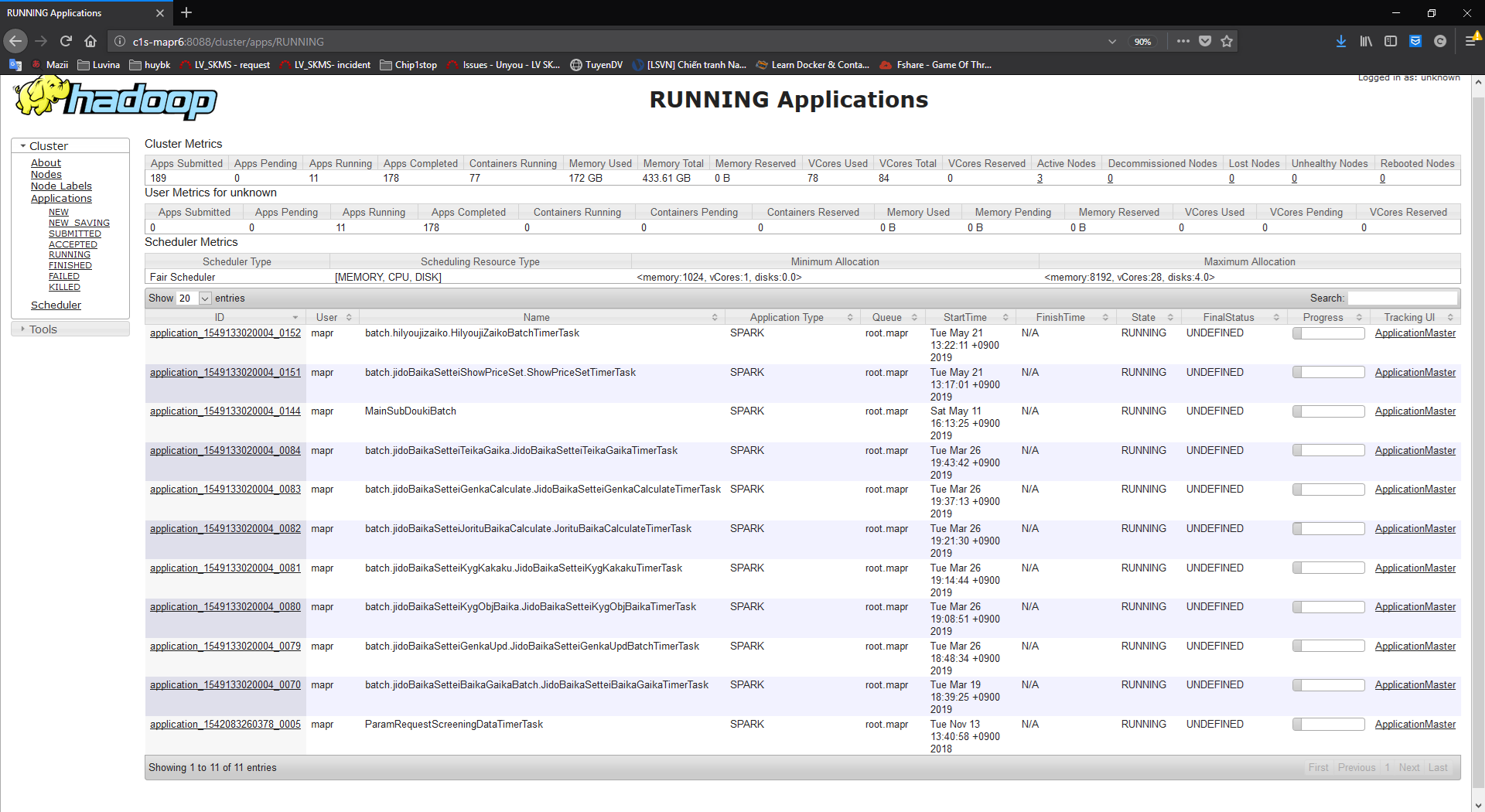
  • Có thể xem các con số trên tại trang running custer của resource manager:

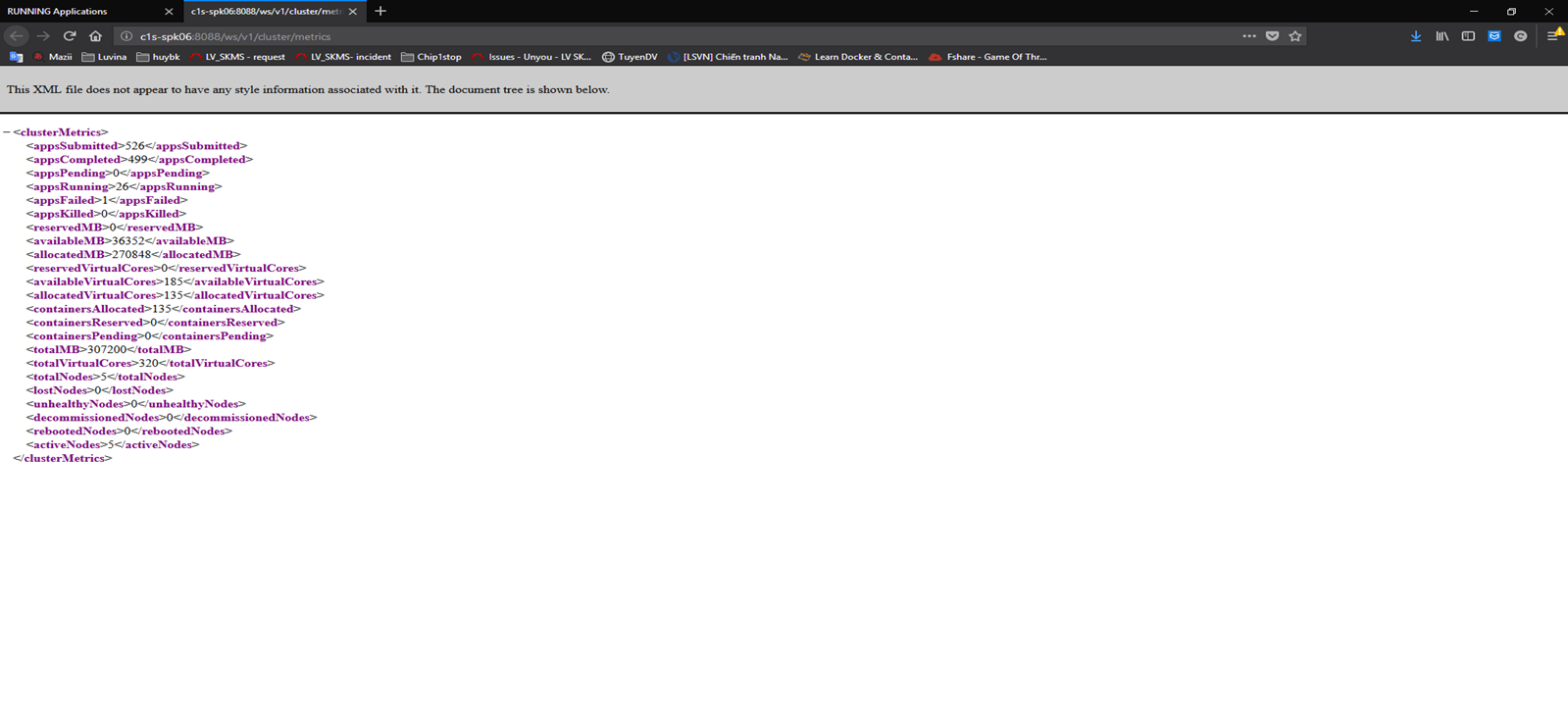
  • Ngoài ra, còn có thể sụng API để lấy các con số này:

Dưới đây là script thực hiện lấy các giá trị:

Apps Submitted
Apps Pending
Apps Running
Memory Used

Memory Total

VCores Used

VCores Total

Active Nodes

lostNodes

unhealthyNodes

totalNodes

Các giá trị này để gửi tới zabbix để xây dựng biểu đồ, và lưu trữ, thiết lập cảnh báo.

Dưới đây là script lấy số liệu:

#!/bin/bash

echo "appsSubmitted

appsPending


appsRunning


allocatedMB


totalMB


allocatedVirtualCores


totalVirtualCores


activeNodes


lostNodes


unhealthyNodes


totalNodes" > /tmp/readkey


curl -s -H "Content-Type: application/xml" http://c2s-spk06:8088/ws/v1/cluster/metrics http://c2s-spk07:8088/ws/v1/cluster/metrics > /tmp/input


IFS=$'\n'


for i in `cat /tmp/readkey`;do


a=`egrep -o "${i}\":[0-9]+" /tmp/input | awk -F':' '{print $2}'`


echo "$HOSTNAME yarn.metric.$i $a"


done


Output có dạng:

c2s-spk06 yarn.metric.appsSubmitted 443
c2s-spk06 yarn.metric.appsPending 0
c2s-spk06 yarn.metric.appsRunning 25
c2s-spk06 yarn.metric.allocatedMB 265216

c2s-spk06 yarn.metric.totalMB 307200

c2s-spk06 yarn.metric.allocatedVirtualCores 131

c2s-spk06 yarn.metric.totalVirtualCores 320

c2s-spk06 yarn.metric.activeNodes 5

c2s-spk06 yarn.metric.lostNodes 0

c2s-spk06 yarn.metric.unhealthyNodes 0

c2s-spk06 yarn.metric.totalNodes 5

Thiết lập đặt vào cron của máy hadoop, chạy 10 phút 1 lần, và đẩy output cho zabbix sender xử lý, gửi tới zabbix server, chi tiết cú pháp xem help của zabbix sender.

*/10 * * * * /bin/bash GetClusterMetricSpark.sh | /usr/local/zabbix/bin/zabbix_sender -i - -z ws-zbx