Cài đặt gcc mới nhất từ source trên centos 7

Mặc định cài từ yum của centos 7 chỉ có gcc 4.8.5. Khá là cũ, các software mới như redis yêu cầu tối thiểu phải 4.9 mới buld được. Cách cài đặt gcc mới hơn như sau:

Tìm source từ trang chủ: https://gcc.gnu.org/mirrors.html
Tìm được  1 repo cảm thấy gần mình nhất sau đó truy cập vào, lấy ra link release, wget về là OK, ở đây là link:

wget http://ftp.tsukuba.wide.ad.jp/software/gcc/releases/gcc-10.1.0/gcc-10.1.0.tar.gz

Giải nén sau đó tiến hành cài đặt:

yum -y install bzip2 wget gcc gcc-c++ gmp-devel mpfr-devel libmpc-devel make

wget http://ftp.tsukuba.wide.ad.jp/software/gcc/releases/gcc-10.1.0/gcc-10.1.0.tar.gz

tar xzvf gcc-10.1.0.tar.gz

cd gcc-10.1.0

./configure --enable-languages=c,c++ --disable-multilib

make -j$(nproc)

make install

Sau khi make install tiến hành khai báo

export PATH=/usr/local/bin:$PATH

export LD_LIBRARY_PATH=/usr/local/lib64:$LD_LIBRARY_PATH

cat <<EOF >  /etc/profile.d/gcc10.sh

export PATH=/usr/local/bin:$PATH

export LD_LIBRARY_PATH=/usr/local/lib64:$LD_LIBRARY_PATH

EOF

test lại output thế này là OK

[root@redis1 redis-6.0.1]# gcc -v

Using built-in specs.

COLLECT_GCC=gcc

COLLECT_LTO_WRAPPER=/usr/local/libexec/gcc/x86_64-pc-linux-gnu/10.1.0/lto-wrapper

Target: x86_64-pc-linux-gnu

Configured with: ./configure --enable-languages=c,c++ --disable-multilib

Thread model: posix

Supported LTO compression algorithms: zlib

gcc version 10.1.0 (GCC)

[root@redis1 redis-6.0.1]#


Xử lý lỗi Memory limit doesn’t accept the negative value trên giao diện web vmware vsphere

Screen Shot 2017-08-17 at 01.04.34.png

Khi sử dụng vmware vsphere trên firefox thường có những lỗi vặt  như thế này rất khó chịu. Nguyên  nhân do bug của bản ESXi Embedded Host Client 1.8.0
Để khắc phục cần update patch cho thằng này.
Cách làm như sau:
– Download vib patch về.
– Sử dụng winscp, copy file vừa down lên host ESXi (ESXi sẽ cần enable SSH để làm được việc này)
– Cài đặt:

esxcli software vib install -v esxui-signed-12086396.vib

nếu báo lỗi xung đột với ghettovcb thì remove ghettovcb

[root@nola:/tmp] esxcli software vib install -v esxui-signed-12086396.vib

 [DependencyError]

 VIB virtuallyGhetto_bootbank_ghettoVCB_1.0.0-0.0.0's acceptance level is community, which is not compliant with the ImageProfile acceptance level partner

 VIB virtuallyGhetto_bootbank_ghettoVCB_1.0.0-0.0.0 violates extensibility rule checks: ['(line 24: col 0) Element vib failed to validate content']

 To change the host acceptance level, use the 'esxcli software acceptance set' command.

 Please refer to the log file for more details.

[root@nola:/tmp]  esxcli software vib remove -n ghettoVCB

Removal Result

   Message: Operation finished successfully.

   Reboot Required: false

   VIBs Installed:

   VIBs Removed: virtuallyGhetto_bootbank_ghettoVCB_1.0.0-0.0.0

   VIBs Skipped:

[root@nola:/tmp] esxcli software acceptance set --level=CommunitySupported

Host acceptance level changed to 'CommunitySupported'.

[root@nola:/tmp] esxcli software vib install -v esxui-signed-12086396.vib

Installation Result

   Message: Operation finished successfully.

   Reboot Required: false

   VIBs Installed: VMware_bootbank_esx-ui_1.33.1-12086396

   VIBs Removed: VMware_bootbank_esx-ui_1.8.0-4516221

   VIBs Skipped:

[root@nola:/tmp]


Fix lỗi thời gian bị thay đổi do cài song song ubuntu và windows

Đối với những ai cài song song 2 hệ điều hành windows và ubuntu chắc hẳn đều sẽ gặp lỗi time của máy bị thay đổi sau khi chuyển qua lại giữa 2 hệ điều hành, mỗi lần thế phải tự chỉnh lại rất khó chịu.

Nguyên nhân do Ubuntu maintain hardware clock ở giờ UTC, còn windows cũng maintain hardware clock nhưng với localtime.

Cách fix có 2 cách:

  • Bắt ubuntu sử dụng localtime như windows.
  • Bắt windows sử dụng utc time như ubuntu.

Cách 1 – Bắt ubuntu sử dụng localtime như windows
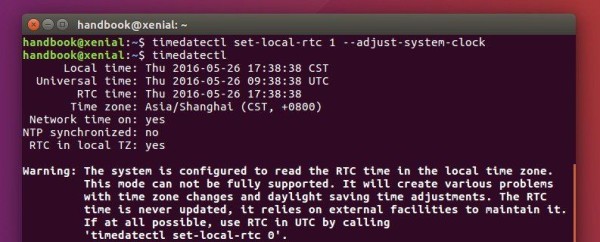
Có thể edit file /etc/default/rcS hoặc chạy lệnh

timedatectl set-local-rtc 1 --adjust-system-clock

Check lại

timedatectl


Cách 2 – Bắt windows sử dụng utc time như ubuntu.

Mở windows CMD với quyền admin:

Reg add HKLM\SYSTEM\CurrentControlSet\Control\TimeZoneInformation /v RealTimeIsUniversal /t REG_DWORD /d 1

Reg add HKLM\SYSTEM\CurrentControlSet\Control\TimeZoneInformation /v RealTimeIsUniversal /t REG_QWORD /d 1


Thêm disk cho LVM

Ngày mua máy chủ, sếp bảo: cty ta nghèo đói rách nát, đợt này mua máy chủ, k đủ tiền mua con ổ to, anh em chịu khó, mai mốt có lãi ta mua thêm ổ nữa cắm vào. Lúc ấy thằng éo nào cũng gật gù, đành chịu chứ làm sao, sếp k có tiền chả lẽ cả lũ thích sếp trừ lương lấy tiền mua ổ cứng.
Dùng được một thời gian, cuối cùng ngày đó cũng tới. Sếp cho thêm con ổ nữa , nhưng khốn nạn là con máy chủ đang chạy, có cách nào nới rộng ra mà không ảnh hưởng gì không?
May thay, hồi xưa cài máy, anh em khôn nên cài lvm, mà mặc định cài centos 7 nó đã có lvm rồi, giờ chỉ add disk vào resize là được. Dưới đây, chúng ta sẽ làm điều đó:

Môi trường gốc:

OS: Centos 7

mount point / dung lượng 5GB

Add thêm ổ mới 10GB

-> mục tiêu có / = 15GB

Layout đĩa ban đầu

[root@localhost ~]# df -h

Filesystem                     Size  Used Avail Use% Mounted on

/dev/mapper/volumegroup1-root  4.5G  1.6G  3.0G  34% /

devtmpfs                       980M     0  980M   0% /dev

tmpfs                          992M     0  992M   0% /dev/shm

tmpfs                          992M  9.6M  982M   1% /run

tmpfs                          992M     0  992M   0% /sys/fs/cgroup

/dev/sda1                      477M  100M  348M  23% /boot

tmpfs                          199M     0  199M   0% /run/user/0

/dev/sdb1                      4.8G   20M  4.6G   1% /data

[root@localhost ~]# lsblk

NAME                  MAJ:MIN RM  SIZE RO TYPE MOUNTPOINT

sda                     8:0    0    5G  0 disk

├─sda1                  8:1    0  500M  0 part /boot

└─sda2                  8:2    0  4.5G  0 part

  └─volumegroup1-root 253:0    0  4.5G  0 lvm  /

sdb                     8:16   0    5G  0 disk

└─sdb1                  8:17   0    5G  0 part /data

sr0                    11:0    1 1024M  0 rom

Thấy thằng / có type lvm.
Những thằng type là part thì chỉ có nước tắt máy, resize bằng các tool như Gparted, ở đây, chúng tôi không làm thế.
Tiến hành cắm thêm đĩa mới vào máy, nếu là máy ảo thì add thêm disk, nếu là máy vật lý thì cắm disk vào rồi tạo raid, cách làm thì mỗi case mỗi khác, nằm ngoài khuôn khổ bài viết này. Chúng ta skip, nhảy tới bước đã cắm ổ vào OK. Tiến hành refresh lại để centos nhận ra ổ đĩa mới:

echo "- - -" > /sys/class/scsi_host/host0/scan

echo "- - -" > /sys/class/scsi_host/host1/scan

echo "- - -" > /sys/class/scsi_host/host2/scan

sau đó check lại ổ đĩa

[root@localhost ~]# fdisk -l


Disk /dev/sda: 5368 MB, 5368709120 bytes, 10485760 sectors

Units = sectors of 1 * 512 = 512 bytes

Sector size (logical/physical): 512 bytes / 512 bytes

I/O size (minimum/optimal): 512 bytes / 512 bytes

Disk label type: dos

Disk identifier: 0x00013f52


   Device Boot      Start         End      Blocks   Id  System

/dev/sda1   *        2048     1026047      512000   83  Linux

/dev/sda2         1026048    10485759     4729856   8e  Linux LVM


Disk /dev/sdb: 5368 MB, 5368709120 bytes, 10485760 sectors

Units = sectors of 1 * 512 = 512 bytes

Sector size (logical/physical): 512 bytes / 512 bytes

I/O size (minimum/optimal): 512 bytes / 512 bytes

Disk label type: dos

Disk identifier: 0x6ed73018


   Device Boot      Start         End      Blocks   Id  System

/dev/sdb1            2048    10485759     5241856   8e  Linux LVM


Disk /dev/mapper/volumegroup1-root: 4840 MB, 4840226816 bytes, 9453568 sectors

Units = sectors of 1 * 512 = 512 bytes

Sector size (logical/physical): 512 bytes / 512 bytes

I/O size (minimum/optimal): 512 bytes / 512 bytes


Disk /dev/sdc: 10.7 GB, 10737418240 bytes, 20971520 sectors

Units = sectors of 1 * 512 = 512 bytes

Sector size (logical/physical): 512 bytes / 512 bytes

I/O size (minimum/optimal): 512 bytes / 512 bytes

Thấy ổ sdc mới xuất hiện. Nếu không xuất hiện thì các bạn check trong /sys/class/scsi_host/ xem còn host nào thì lặp lại bước echo ở trên.
Tiến hành tạo partition mới với type 8e, linux LVM

[root@localhost ~]# fdisk /dev/sdc

Welcome to fdisk (util-linux 2.23.2).


Changes will remain in memory only, until you decide to write them.

Be careful before using the write command.


Device does not contain a recognized partition table

Building a new DOS disklabel with disk identifier 0x03cec27c.


Command (m for help): m

Command action

   a   toggle a bootable flag

   b   edit bsd disklabel

   c   toggle the dos compatibility flag

   d   delete a partition

   g   create a new empty GPT partition table

   G   create an IRIX (SGI) partition table

   l   list known partition types

   m   print this menu

   n   add a new partition

   o   create a new empty DOS partition table

   p   print the partition table

   q   quit without saving changes

   s   create a new empty Sun disklabel

   t   change a partition's system id

   u   change display/entry units

   v   verify the partition table

   w   write table to disk and exit

   x   extra functionality (experts only)


Command (m for help):

Chọn n để add partition mới, sau đó chọn p để tạo primary partition, tiếp theo nhập 1,

Command (m for help): n

Partition type:

   p   primary (0 primary, 0 extended, 4 free)

   e   extended

Select (default p): p

Partition number (1-4, default 1): 1

First sector (2048-20971519, default 2048):

Using default value 2048

Last sector, +sectors or +size{K,M,G} (2048-20971519, default 20971519):

Using default value 20971519

Partition 1 of type Linux and of size 10 GiB is set


Command (m for help): t

Selected partition 1

Hex code (type L to list all codes): 8e

Changed type of partition 'Linux' to 'Linux LVM'


Command (m for help): w

The partition table has been altered!


Calling ioctl() to re-read partition table.

Syncing disks.

[root@localhost ~]#

Fdisk -l lần nữa sẽ thấy sdc mới đã được partition, với phân vùng sdc1

[root@localhost ~]# fdisk -l


Disk /dev/sda: 5368 MB, 5368709120 bytes, 10485760 sectors

Units = sectors of 1 * 512 = 512 bytes

Sector size (logical/physical): 512 bytes / 512 bytes

I/O size (minimum/optimal): 512 bytes / 512 bytes

Disk label type: dos

Disk identifier: 0x00013f52


   Device Boot      Start         End      Blocks   Id  System

/dev/sda1   *        2048     1026047      512000   83  Linux

/dev/sda2         1026048    10485759     4729856   8e  Linux LVM


Disk /dev/sdb: 5368 MB, 5368709120 bytes, 10485760 sectors

Units = sectors of 1 * 512 = 512 bytes

Sector size (logical/physical): 512 bytes / 512 bytes

I/O size (minimum/optimal): 512 bytes / 512 bytes

Disk label type: dos

Disk identifier: 0x6ed73018


   Device Boot      Start         End      Blocks   Id  System

/dev/sdb1            2048    10485759     5241856   8e  Linux LVM


Disk /dev/mapper/volumegroup1-root: 4840 MB, 4840226816 bytes, 9453568 sectors

Units = sectors of 1 * 512 = 512 bytes

Sector size (logical/physical): 512 bytes / 512 bytes

I/O size (minimum/optimal): 512 bytes / 512 bytes


Disk /dev/sdc: 10.7 GB, 10737418240 bytes, 20971520 sectors

Units = sectors of 1 * 512 = 512 bytes

Sector size (logical/physical): 512 bytes / 512 bytes

I/O size (minimum/optimal): 512 bytes / 512 bytes

Disk label type: dos

Disk identifier: 0x03cec27c


   Device Boot      Start         End      Blocks   Id  System

/dev/sdc1            2048    20971519    10484736   8e  Linux LVM

[root@localhost ~]#

Tạo physical volume mới cho sdc1

[root@localhost ~]# pvcreate /dev/sdc1

  Physical volume "/dev/sdc1" successfully created.

[root@localhost ~]#

Check lại thông tin LVM của máy

[root@localhost ~]# vgdisplay

  --- Volume group ---

  VG Name               volumegroup1

  System ID

  Format                lvm2

  Metadata Areas        1

  Metadata Sequence No  2

  VG Access             read/write

  VG Status             resizable

  MAX LV                0

  Cur LV                1

  Open LV               1

  Max PV                0

  Cur PV                1

  Act PV                1

  VG Size               <4.51 GiB

  PE Size               4.00 MiB

  Total PE              1154

  Alloc PE / Size       1154 / <4.51 GiB

  Free  PE / Size       0 / 0

  VG UUID               oRu742-MhoW-MJMV-uS8e-FHXV-yNor-Gb7N85

Quan tâm tới VG Name, ở đây là volumegroup1
Add thêm sdc1 ở trên vào volumegroup1

[root@localhost ~]# vgextend volumegroup1 /dev/sdc1

  Volume group "volumegroup1" successfully extended

[root@localhost ~]#

Chạy pvscan để confirm lại, ta thấy cả 2 ổ cũ và mới

[root@localhost ~]# pvscan

  PV /dev/sda2   VG volumegroup1    lvm2 [<4.51 GiB / 0    free]

  PV /dev/sdc1   VG volumegroup1    lvm2 [<10.00 GiB / <10.00 GiB free]

  Total: 2 [14.50 GiB] / in use: 2 [14.50 GiB] / in no VG: 0 [0   ]

[root@localhost ~]#

Tiếp theo chúng ta check lại thông tin của logical volume

[root@localhost ~]# lvdisplay

  --- Logical volume ---

  LV Path                /dev/volumegroup1/root

  LV Name                root

  VG Name                volumegroup1

  LV UUID                ES1sxH-Fqpj-eVFl-bsNm-6SRg-P7pl-9dOq9P

  LV Write Access        read/write

  LV Creation host, time localhost, 2020-04-08 15:55:13 +0700

  LV Status              available

  # open                 1

  LV Size                <4.51 GiB

  Current LE             1154

  Segments               1

  Allocation             inherit

  Read ahead sectors     auto

  - currently set to     8192

  Block device           253:0


[root@localhost ~]#

Quan tâm tới LV Path và LV Name

Exten logical volume, add sdc1 ở trên vào LV Path.

[root@localhost ~]# lvextend /dev/volumegroup1/root /dev/sdc1

  Size of logical volume volumegroup1/root changed from <4.51 GiB (1154 extents) to 14.50 GiB (3713 extents).

  Logical volume volumegroup1/root successfully resized.

[root@localhost ~]#

Tuy nhiên, nếu df -h, chúng ta sẽ thấy y nguyên, chưa có sự thay đổi nào cả:

[root@localhost ~]# df -h

Filesystem                     Size  Used Avail Use% Mounted on

/dev/mapper/volumegroup1-root  4.5G  1.6G  3.0G  34% /

devtmpfs                       980M     0  980M   0% /dev

tmpfs                          992M     0  992M   0% /dev/shm

tmpfs                          992M  9.6M  982M   1% /run

tmpfs                          992M     0  992M   0% /sys/fs/cgroup

/dev/sda1                      477M  100M  348M  23% /boot

tmpfs                          199M     0  199M   0% /run/user/0

/dev/sdb1                      4.8G   20M  4.6G   1% /data

Việc tiếp theo để có thể sử dụng được phần dung lượng mới thêm vào đó là resize lại file system.
nãy giờ resize cho / nên kiểm tra lại xem thằng này đang được mount dưới định dạng nào. gõ lệnh mount

[root@localhost ~]# mount

sysfs on /sys type sysfs (rw,nosuid,nodev,noexec,relatime,seclabel)

proc on /proc type proc (rw,nosuid,nodev,noexec,relatime)

devtmpfs on /dev type devtmpfs (rw,nosuid,seclabel,size=1002592k,nr_inodes=250648,mode=755)

securityfs on /sys/kernel/security type securityfs (rw,nosuid,nodev,noexec,relatime)

tmpfs on /dev/shm type tmpfs (rw,nosuid,nodev,seclabel)

devpts on /dev/pts type devpts (rw,nosuid,noexec,relatime,seclabel,gid=5,mode=620,ptmxmode=000)

tmpfs on /run type tmpfs (rw,nosuid,nodev,seclabel,mode=755)

tmpfs on /sys/fs/cgroup type tmpfs (ro,nosuid,nodev,noexec,seclabel,mode=755)

cgroup on /sys/fs/cgroup/systemd type cgroup (rw,nosuid,nodev,noexec,relatime,seclabel,xattr,release_agent=/usr/lib/systemd/systemd-cgroups-agent,name=systemd)

pstore on /sys/fs/pstore type pstore (rw,nosuid,nodev,noexec,relatime)

cgroup on /sys/fs/cgroup/devices type cgroup (rw,nosuid,nodev,noexec,relatime,seclabel,devices)

cgroup on /sys/fs/cgroup/cpu,cpuacct type cgroup (rw,nosuid,nodev,noexec,relatime,seclabel,cpuacct,cpu)

cgroup on /sys/fs/cgroup/cpuset type cgroup (rw,nosuid,nodev,noexec,relatime,seclabel,cpuset)

cgroup on /sys/fs/cgroup/hugetlb type cgroup (rw,nosuid,nodev,noexec,relatime,seclabel,hugetlb)

cgroup on /sys/fs/cgroup/blkio type cgroup (rw,nosuid,nodev,noexec,relatime,seclabel,blkio)

cgroup on /sys/fs/cgroup/memory type cgroup (rw,nosuid,nodev,noexec,relatime,seclabel,memory)

cgroup on /sys/fs/cgroup/pids type cgroup (rw,nosuid,nodev,noexec,relatime,seclabel,pids)

cgroup on /sys/fs/cgroup/net_cls,net_prio type cgroup (rw,nosuid,nodev,noexec,relatime,seclabel,net_prio,net_cls)

cgroup on /sys/fs/cgroup/freezer type cgroup (rw,nosuid,nodev,noexec,relatime,seclabel,freezer)

cgroup on /sys/fs/cgroup/perf_event type cgroup (rw,nosuid,nodev,noexec,relatime,seclabel,perf_event)

configfs on /sys/kernel/config type configfs (rw,relatime)

/dev/mapper/volumegroup1-root on / type xfs (rw,relatime,seclabel,attr2,inode64,noquota)

selinuxfs on /sys/fs/selinux type selinuxfs (rw,relatime)

systemd-1 on /proc/sys/fs/binfmt_misc type autofs (rw,relatime,fd=31,pgrp=1,timeout=0,minproto=5,maxproto=5,direct,pipe_ino=14970)

mqueue on /dev/mqueue type mqueue (rw,relatime,seclabel)

debugfs on /sys/kernel/debug type debugfs (rw,relatime)

hugetlbfs on /dev/hugepages type hugetlbfs (rw,relatime,seclabel)

/dev/sda1 on /boot type ext4 (rw,relatime,seclabel,data=ordered)

tmpfs on /run/user/0 type tmpfs (rw,nosuid,nodev,relatime,seclabel,size=203020k,mode=700)

/dev/sdb1 on /data type ext4 (rw,relatime,seclabel,data=ordered)

Để ý thấy dòng
/dev/mapper/volumegroup1-root on / type xfs (rw,relatime,seclabel,attr2,inode64,noquota)
Định dạng là xfs, chúng ta chạy lệnh sau:

[root@localhost ~]# xfs_growfs /dev/volumegroup1/root

meta-data=/dev/mapper/volumegroup1-root isize=512    agcount=4, agsize=295424 blks

         =                       sectsz=512   attr=2, projid32bit=1

         =                       crc=1        finobt=0 spinodes=0

data     =                       bsize=4096   blocks=1181696, imaxpct=25

         =                       sunit=0      swidth=0 blks

naming   =version 2              bsize=4096   ascii-ci=0 ftype=1

log      =internal               bsize=4096   blocks=2560, version=2

         =                       sectsz=512   sunit=0 blks, lazy-count=1

realtime =none                   extsz=4096   blocks=0, rtextents=0

data blocks changed from 1181696 to 3802112

Với /dev/volumegroup1/root chính là LV Path đã extent ở trên.
Nếu / được mount với định dang ext2,3,4 gì đó thì chúng ta chạy lệnh:

resize2fs /dev/volumegroup1/root

Check lại df -h

[root@localhost ~]# df -h

Filesystem                     Size  Used Avail Use% Mounted on

/dev/mapper/volumegroup1-root   15G  1.6G   13G  11% /

devtmpfs                       980M     0  980M   0% /dev

tmpfs                          992M     0  992M   0% /dev/shm

tmpfs                          992M  9.6M  982M   1% /run

tmpfs                          992M     0  992M   0% /sys/fs/cgroup

/dev/sda1                      477M  100M  348M  23% /boot

tmpfs                          199M     0  199M   0% /run/user/0

/dev/sdb1                      4.8G   20M  4.6G   1% /data

Đã thấy thêm được chục GB, ứng dụng vẫn chạy như chưa hề có cuộc chia ly.

Xử lý lỗi crontab truncate command

Case: Nhét 1 đoạn mysqldump vào crontab để backup db hàng đêm. Sáng hôm sau kiểm tra ko thấy file dump đâu.
đoạn command khai báo crontab

0 0 * * * /usr/bin/mysqldump -uzabbixuser -pMikita zabbixdb > /opt/backup/zabbixdb-`date +%F`.sql

Giải quyết ra sao?
chạy bằng crontab nên output lúc chạy sẽ được ném vào /var/mail/<user>
Ở đây chúng ta chạy cron trên user root, check file /var/mail/root

From [email protected]  Tue Mar 31 00:00:01 2020

Return-Path: <[email protected]>

X-Original-To: root

Delivered-To: [email protected]

Received: by devopsvn.xyz.localdomain (Postfix, from userid 0)

        id 1FCA36000345; Tue, 31 Mar 2020 00:00:01 +0700 (+07)

From: [email protected] (Cron Daemon)

To: [email protected]

Subject: Cron <[email protected]> /usr/bin/mysqldump -uzabbixuser -pMikita zabbixdb > /opt/backup/zabbixdb-`date +

Content-Type: text/plain; charset=UTF-8

Auto-Submitted: auto-generated

X-Cron-Env: <LANG=en_US.UTF-8>

X-Cron-Env: <SHELL=/bin/sh>

X-Cron-Env: <HOME=/root>

X-Cron-Env: <PATH=/usr/bin:/bin>

X-Cron-Env: <LOGNAME=root>

X-Cron-Env: <USER=root>

Message-Id: <[email protected]>

Date: Tue, 31 Mar 2020 00:00:01 +0700 (+07)


/bin/sh: -c: line 0: unexpected EOF while looking for matching ``'

/bin/sh: -c: line 1: syntax error: unexpected end of file

Để ý dòng subject, thấy command của chúng ta bị cắt mất còn 1 đoạn ngắn xíu, nguyên nhân do ký tự %

Percent-signs (%) in the command, unless escaped with backslash (\), 

will be changed into newline characters, and all data after the 

first % will be sent to the command as standard input.

tiến hành escape ký tự %, cron thay đổi thành

0 0 * * * /usr/bin/mysqldump -uzabbixuser -pMikita zabbixdb > /opt/backup/zabbixdb-`date +\%F`.sql

lưu lại crontab.

Khắc phục lỗi tomcat khởi động chậm

Khi bật tomcat, từ khi chạy startup tới khi server hoàn tất online có thể lên tới 30s. Nếu kiểm tra log catalina.out có thể thấy ghi chú rõ thời gian khởi động cho từng tiến trình của tomcat
Ví dụ:

31-Mar-2020 08:30:51.102 WARNING [main] org.apache.catalina.core.StandardContext.setPath A context path must either be an empty string or sta

rt with a '/' and do not end with a '/'. The path [bill-live2] does not meet these criteria and has been changed to [/bill-live2]

31-Mar-2020 08:30:51.114 INFO [main] org.apache.catalina.startup.VersionLoggerListener.log Server version:        Apache Tomcat/8.5.3

31-Mar-2020 08:30:51.114 INFO [main] org.apache.catalina.startup.VersionLoggerListener.log Server built:          Jun 9 2016 11:16:29 UTC

31-Mar-2020 08:30:51.114 INFO [main] org.apache.catalina.startup.VersionLoggerListener.log Server number:         8.5.3.0

31-Mar-2020 08:30:51.114 INFO [main] org.apache.catalina.startup.VersionLoggerListener.log OS Name:               Linux

31-Mar-2020 08:30:51.114 INFO [main] org.apache.catalina.startup.VersionLoggerListener.log OS Version:            2.6.32-642.el6.x86_64

31-Mar-2020 08:30:51.114 INFO [main] org.apache.catalina.startup.VersionLoggerListener.log Architecture:          amd64

31-Mar-2020 08:30:51.114 INFO [main] org.apache.catalina.startup.VersionLoggerListener.log Java Home:             /home/java8/jre

31-Mar-2020 08:30:51.114 INFO [main] org.apache.catalina.startup.VersionLoggerListener.log JVM Version:           1.8.0_101-b13

31-Mar-2020 08:30:51.115 INFO [main] org.apache.catalina.startup.VersionLoggerListener.log JVM Vendor:            Oracle Corporation

31-Mar-2020 08:30:51.115 INFO [main] org.apache.catalina.startup.VersionLoggerListener.log CATALINA_BASE:         /home/devopsvn.xyz/runtime

/huybk.com-live2

31-Mar-2020 08:30:51.115 INFO [main] org.apache.catalina.startup.VersionLoggerListener.log CATALINA_HOME:         /home/devopsvn.xyz/runtime

/huybk.com-live2

31-Mar-2020 08:30:51.115 INFO [main] org.apache.catalina.startup.VersionLoggerListener.log Command line argument: -Djava.util.logging.config.

file=/home/devopsvn.xyz/runtime/huybk.com-live2/conf/logging.properties

31-Mar-2020 08:30:51.115 INFO [main] org.apache.catalina.startup.VersionLoggerListener.log Command line argument: -Djava.util.logging.manager

=org.apache.juli.ClassLoaderLogManager

31-Mar-2020 08:30:51.115 INFO [main] org.apache.catalina.startup.VersionLoggerListener.log Command line argument: -Djdk.tls.ephemeralDHKeySiz

e=2048

31-Mar-2020 08:30:51.115 INFO [main] org.apache.catalina.startup.VersionLoggerListener.log Command line argument: -Dcatalina.base=/home/congt

hanhtoan/runtime/huybk.com-live2

31-Mar-2020 08:30:51.115 INFO [main] org.apache.catalina.startup.VersionLoggerListener.log Command line argument: -Dcatalina.home=/home/congt

hanhtoan/runtime/huybk.com-live2

31-Mar-2020 08:30:51.116 INFO [main] org.apache.catalina.startup.VersionLoggerListener.log Command line argument: -Djava.io.tmpdir=/home/cong

thanhtoan/runtime/huybk.com-live2/temp

31-Mar-2020 08:30:51.116 INFO [main] org.apache.catalina.core.AprLifecycleListener.lifecycleEvent The APR based Apache Tomcat Native library

which allows optimal performance in production environments was not found on the java.library.path: /usr/java/packages/lib/amd64:/usr/lib64:/

lib64:/lib:/usr/lib

31-Mar-2020 08:30:51.235 INFO [main] org.apache.coyote.AbstractProtocol.init Initializing ProtocolHandler ["http-nio-8587"]

31-Mar-2020 08:30:51.254 INFO [main] org.apache.tomcat.util.net.NioSelectorPool.getSharedSelector Using a shared selector for servlet write/r

ead

31-Mar-2020 08:30:51.256 INFO [main] org.apache.catalina.startup.Catalina.load Initialization processed in 585 ms

31-Mar-2020 08:30:51.280 INFO [main] org.apache.catalina.core.StandardService.startInternal Starting service Catalina

31-Mar-2020 08:30:51.280 INFO [main] org.apache.catalina.core.StandardEngine.startInternal Starting Servlet Engine: Apache Tomcat/8.5.3

31-Mar-2020 08:30:51.280 INFO [main] org.apache.catalina.core.StandardEngine.startInternal Starting Servlet Engine: Apache Tomcat/8.5.3

31-Mar-2020 08:30:53.861 INFO [localhost-startStop-1] org.apache.jasper.servlet.TldScanner.scanJars At least one JAR was scanned for TLDs yet contained no TLDs. Enable debug logging for this logger for a complete list of JARs that were scanned but no TLDs were found in them. Skipping unneeded JARs during scanning can improve startup time and JSP compilation time.

SLF4J: Failed to load class "org.slf4j.impl.StaticLoggerBinder".

SLF4J: Defaulting to no-operation (NOP) logger implementation

SLF4J: See http://www.slf4j.org/codes.html#StaticLoggerBinder for further details.

31-Mar-2020 08:31:27.681 INFO [localhost-startStop-1] org.apache.catalina.util.SessionIdGeneratorBase.createSecureRandom Creation of SecureRandom instance for session ID generation using [SHA1PRNG] took [33,353] milliseconds.

31-Mar-2020 08:31:29.269 INFO [main] org.apache.coyote.AbstractProtocol.start Starting ProtocolHandler [http-nio-8587]

31-Mar-2020 08:31:29.278 INFO [main] org.apache.catalina.startup.Catalina.start Server startup in 38021 ms

Như trên, chúng ta có thể thấy tomcat start mất 38s, một con số quá lớn. Nhìn lên phía trên sẽ có tiến trình SessionIdGeneratorBase khởi động mất 33s
Để khắc phục tốc độ khởi động của SessionIdGeneratorBase tiến hành làm như sau
Vào thư mục $JAVA_HOME/jre/lib/security/java.security
Thêm vào cuối file java.security
securerandom.source=file:/dev/urandom
Từ nay sẽ khắc phục được tốc độ khởi động của SessionIdGeneratorBase

Remove hoàn toàn selinux (centos)

Muốn tắt selinux có thể sửa /etc/selinux/config. hoặc setenfoce 0
Tuy nhiên đôi lúc cần xoá triệt để (vì lý do gì đó trời mới  biết) thì làm như sau

Hướng dẫn xoá hoàn toàn selinux trên centos

sudo yum remove selinux-policy*

sudo rm -rf /etc/selinux/targeted

sudo yum install -y selinux-policy-targeted selinux-policy-devel policycoreutils

Port forwarding với netsh (Windows)

Đôi khi, cần thực hiện portwarding 1 số máy trong LAN , với các hệ thống có firewall thì có thể làm điều này dễ dàng, tuy nhiên, đôi lúc giật gấu vá vai, đành phải tạm khắc phục nếu không có firewall. Ở bài trước, chúng ta đã làm điều này dễ dàng với iptables, nhưng iptables chỉ có trên linux. Với các đơn vị nhỏ nhỏ, đa phần là máy người dùng, windows, k lẽ đi cài 1 con linux lên thì về mặt chi phí ko còn khả thi nữa (tiền 1 con PC còn quá tiền mua con firewall phò). May thay, windows cũng làm được điều này với lệnh netsh, mở cmd dưới quyền administrator lên:

Cú pháp:

netsh interface portproxy add v4tov4 listenport=3621 listenaddress=192.168.1.151 connectport=1521 connectaddress=10.1.36.66

Giải thích: máy windows sẽ listen port 3621 , mọi traffic tới port 3621 sẽ điều hướng tới connectaddress=10.1.36.66 và connectport=1521

Để biết hiện tại máy đang proxy những gì:

netsh interface portproxy show all


Port forwarding với iptables


Đôi khi, cần thực hiện portwarding 1 số máy trong LAN với iptables, với các hệ thống có firewall thì có thể làm điều này dễ dàng, tuy nhiên, đôi lúc giật gấu vá vai, đành phải tạm khắc phục nếu không có firewall, iptables sẽ giúp chúng ta làm việc đó
Bước 1: kiểm tra 2 thông số sau của máy

cat /proc/sys/net/ipv4/conf/ppp0/forwarding 

cat /proc/sys/net/ipv4/conf/eth0/forwarding

ppp0 và eth0 là 2 interface ví dụ. nếu return về 1 là OK, nếu không thì thay đổi 2 thông số đó thành 1. cách làm có thể google

echo '1' | sudo tee /proc/sys/net/ipv4/conf/ppp0/forwarding

echo '1' | sudo tee /proc/sys/net/ipv4/conf/eth0/forwarding

Tiến hành mở port

iptables -A PREROUTING -t nat -p tcp --dport 55555 -j DNAT --to 192.168.9.14:3389

iptables -A FORWARD -p tcp -d 192.168.9.14 --dport 3389 -j ACCEPT

Giải thích:

Dòng 1: iptables publish 5555 ra bên ngoài, mọi traffic tới port 55555 được điều hướng tới 192.168.9.14:3389
Dòng 2: Allow truy cập tới 192.168.9.14 3389

Đổi phiên bản office từ retail sang VL

Mở notepad, paste đoạn code bên dưới vào, save lại dưới tên active_office.cmd, sau đó nháy phải vào file cmd vừa tạo, chọn run as administrator, bấm phím bất kỳ để xác nhận

@echo off

Title Converter Office 2016 Retail to Volume


echo Press Enter to start VL-Conversion...

echo.

pause

echo.


for /f "tokens=6 delims=[]. " %%G in ('ver') do set win=%%G


set LICPATH=%ProgramFiles(x86)%\Microsoft Office\root\Licenses16


echo path %LICPATH%


if %win% GEQ 9200 (

cd /D "%SystemRoot%\System32"

cscript slmgr.vbs /ilc "%LICPATH%\ProPlusVL_KMS_Client-ppd.xrm-ms"

cscript slmgr.vbs /ilc "%LICPATH%\ProPlusVL_KMS_Client-ul.xrm-ms"

cscript slmgr.vbs /ilc "%LICPATH%\ProPlusVL_KMS_Client-ul-oob.xrm-ms"

cscript slmgr.vbs /ilc "%LICPATH%\client-issuance-bridge-office.xrm-ms"

cscript slmgr.vbs /ilc "%LICPATH%\client-issuance-root.xrm-ms"

cscript slmgr.vbs /ilc "%LICPATH%\client-issuance-root-bridge-test.xrm-ms"

cscript slmgr.vbs /ilc "%LICPATH%\client-issuance-stil.xrm-ms"

cscript slmgr.vbs /ilc "%LICPATH%\client-issuance-ul.xrm-ms"

cscript slmgr.vbs /ilc "%LICPATH%\client-issuance-ul-oob.xrm-ms"

cscript slmgr.vbs /ilc "%LICPATH%\pkeyconfig-office.xrm-ms"

cscript slmgr.vbs /ipk:XQNVK-8JYDB-WJ9W3-YJ8YR-WFG99

)

if %win% LSS 9200 (

cscript "%ProgramFiles(x86)%\Microsoft Office\Office16\ospp.vbs" /inslic:"%LICPATH%\ProPlusVL_KMS_Client-ppd.xrm-ms"

cscript "%ProgramFiles(x86)%\Microsoft Office\Office16\ospp.vbs" /inslic:"%LICPATH%\ProPlusVL_KMS_Client-ul.xrm-ms"

cscript "%ProgramFiles(x86)%\Microsoft Office\Office16\ospp.vbs" /inslic:"%LICPATH%\ProPlusVL_KMS_Client-ul-oob.xrm-ms"

cscript "%ProgramFiles(x86)%\Microsoft Office\Office16\ospp.vbs" /inslic:"%LICPATH%\pkeyconfig-office.xrm-ms"

cscript "%ProgramFiles(x86)%\Microsoft Office\Office16\ospp.vbs" /inpkey:XQNVK-8JYDB-WJ9W3-YJ8YR-WFG99

)

echo.

echo Retail to Volume License conversion finished.

echo.

pause